


Those that successfully advertise using Google paid search know that the most effective way of doing so is by limiting your spend on unrelated search terms. Effective marketers also know that the number one method to block unrelated and unwanted search terms is with the use of negative keywords.
Especially important for Google Shopping ads where there are no specific targeted keywords. Instead of targeted keywords, with Google Shopping your products are eligible to appear based on Google’s algorithm matching keywords in their product and descriptions with user searches.
This makes monitoring search and continuing to add negative keywords critical to the success of Google Shopping campaigns.
When you first launch a Shopping campaign you should have a list of initial negative keywords to block generic searches.
I have a generic list that I add to new accounts and campaigns which include negative keywords using a phrase match. Examples of these terms include terms such as cheap, knockoff, fake, etc.
However, once you begin running Google paid campaigns you will quickly discover other keywords specific related to your products where you would not have your ads appear.
Being able to identify these keywords has always been a rather straight forward process.
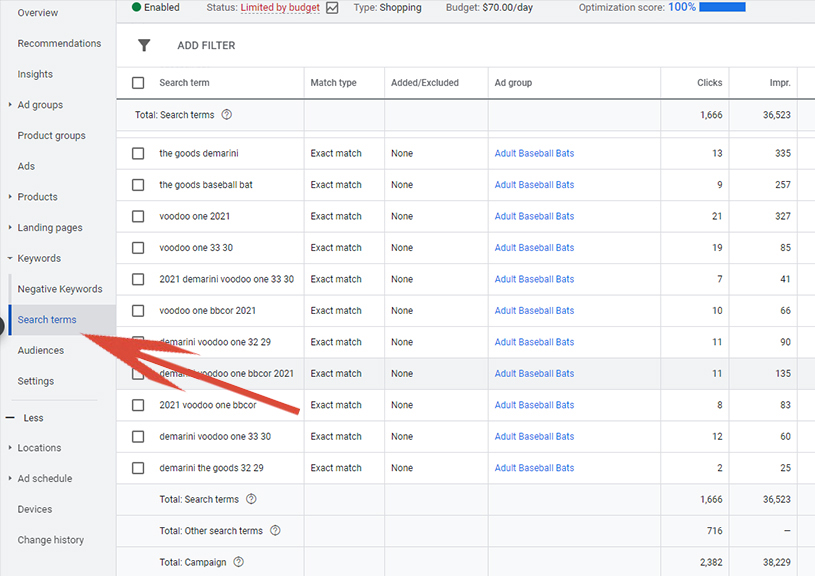
Although it has been moved in the placement through the years, all search terms that have triggered product ads to be displayed have always been available through the Google Search Terms Report.
What Has Changed?
A few months back, Google sent an announcement that they would no longer show irrelevant search terms within the Google search terms report.
Let me tell you for marketers (especially those on a tight marketing budget) there is no such thing as an irrelevant search term when those searches are actively costing you money.
The first month or so after Google’s announcement not much changed. About 95% of search terms were still included within the Google Search Terms report.
However, over the last few weeks only about 50 – 70% of search terms now appear within the Search Terms Report inside the Google Ads interface. This lack of transparency makes it difficult for advertisers to effectively weed out those unprofitable keyword terms that cost budget but produce few sales.
Limiting transparency might well be Google’s long-term plan as they continue to push their automated campaigns including the Smart Shopping.
However at least for now through the end of the year there remains an alternative place to gather your full list of keyword terms driving ad spend.
Google Analytics (Universal Code)
This is great news!
If you have properly installed Google Analytics and have properly linked your Google Analytics account with your Google Ads account, then your full list of search terms is still available within Google Analytics (so-called irrelevant terms and all!).
Note, that these terms are only available within Google Universal Analytics. Google is pushing a new G4 Analytics (Google Analytics 4), which for now WILL NOT include access to search terms.
Fortunately, Google is not requiring advertisers migrate to the new Analytics until the end of 2021.
Accessing Google Analytics Search Queries
Here are the steps:
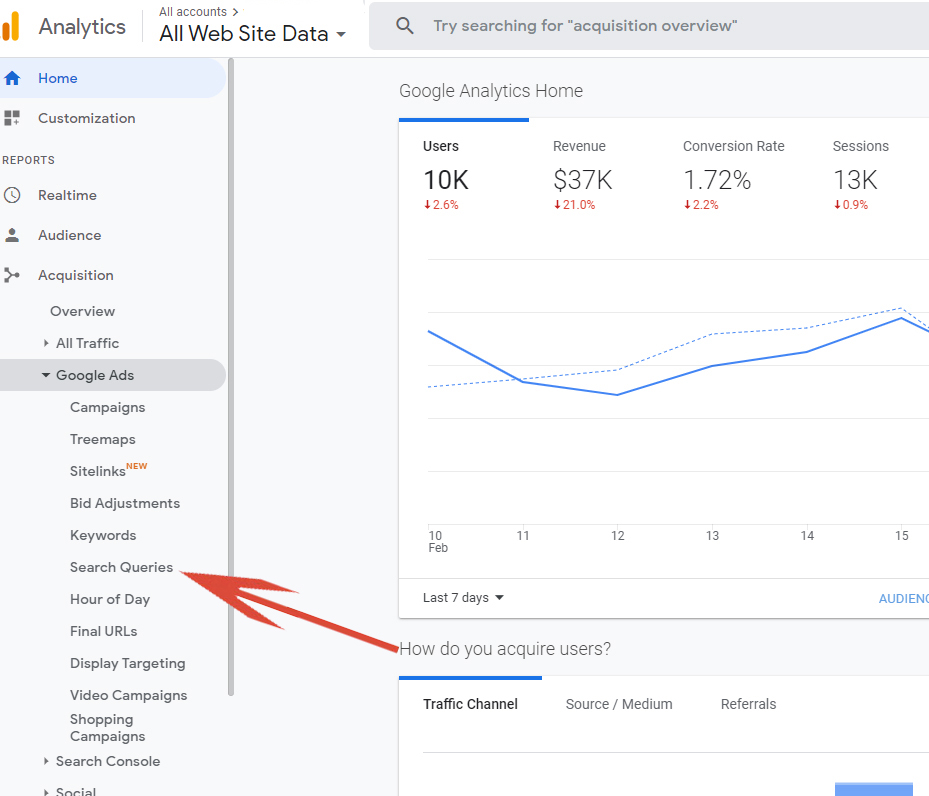
- Login to Google Analytics (https://analytics.google.com/)
- In the left-hand menu click on ‘Acquisition’
- Then, ‘Google Ads’
- Then, ‘Search Queries”
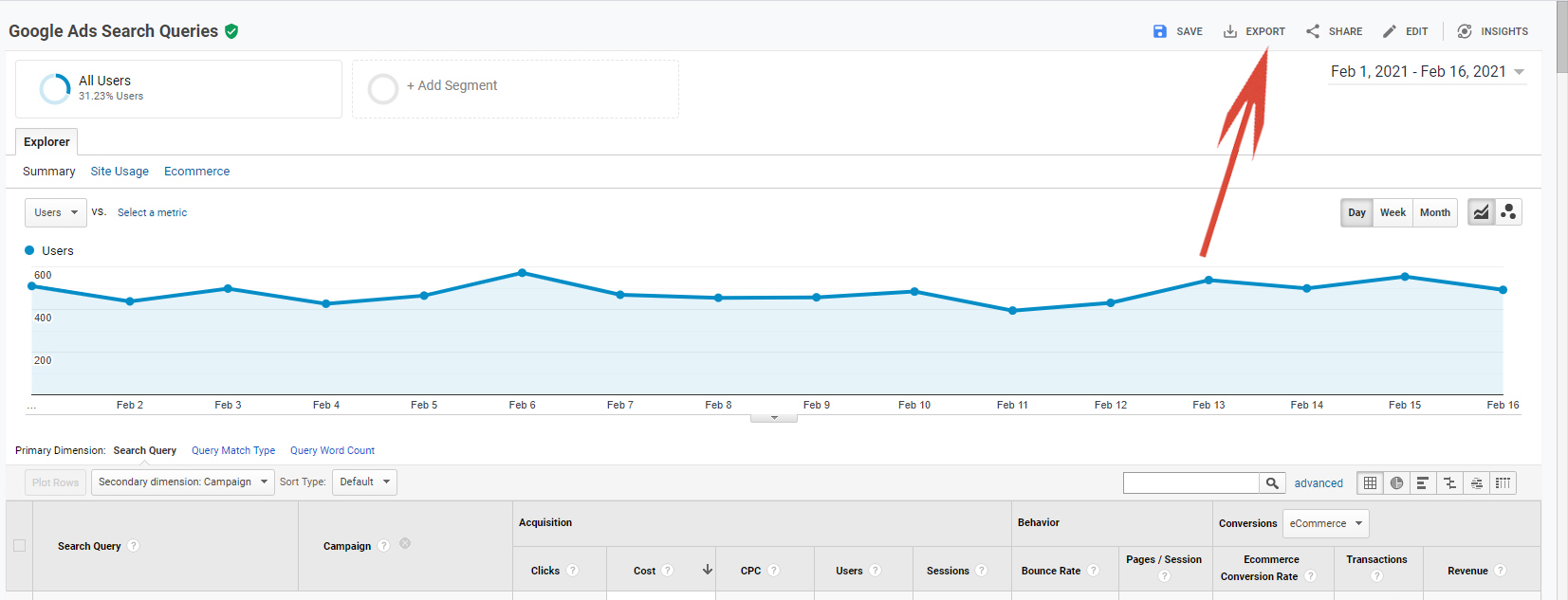
- Change the date in the upper right to dates you wish to view.
- Using the Secondary dimension drop down to add ‘Campaign’. Note, without this step you will be viewing keywords from the entire account.

- Change rows to a number that will display all data (default is only 25 rows).
- Export data.
Final Word
The trend of Google becoming less transparent with their system is a bit unsettling to say the least.
Google continues to try to push their automated marketing including automated bidding and automated placements (Smart Shopping).
Without a doubt, automated or semi-automated campaigns are easy to create and require little to no management from retailers.
However, the problem is that these type of campaigns (when you hand the keys to Google) typically do not perform nearly as well. And when marketing budget is tight, not performing nearly as well can often be the difference between a struggling business and a thriving online business.
Fortunately for now, using the Search Queries report from Google Analytics allows for a workaround to the issue of Google hiding what they now consider to be irrelevant search terms!
Happy Marketing!
Andy Splichal
ABOUT THE AUTHOR

Andy Splichal is the founder and managing partner of True Online Presence, author of the Make Each Click Count book series, host of the Make Each Click Count podcast, founder of Make Each Click Count University and certified online marketing strategist with twenty plus years of experience helping companies increase their online presence and profitable revenues. To find more information on Andy Splichal, visit trueonlinepresence.com or read The Full Story on his blog, blog.trueonlinepresence.com.